
Salesforce UI and SLDS 2
Salesforce is growing fast and many new updates are changing how users work inside CRM. A good user interface is very important because it helps users complete tasks faster and with less confusion. When the UI is clean and simple, users feel comfortable and productivity increases.
Salesforce Lightning Design System, also known as SLDS, plays a big role in keeping the UI consistent across all apps and pages. The new version, SLDS 2, is built to improve design, speed, and flexibility. It also supports better accessibility and modern UI trends.
SLDS 2 is not just a design update. It helps teams build better apps, improve user experience, and keep everything aligned with Salesforce standards. Businesses that upgrade to SLDS 2 can give users a smoother and faster working environment.
If your company is using Salesforce, then upgrading the UI with SLDS 2 can improve both user satisfaction and system performance.
From SLDS 1 to SLDS 2
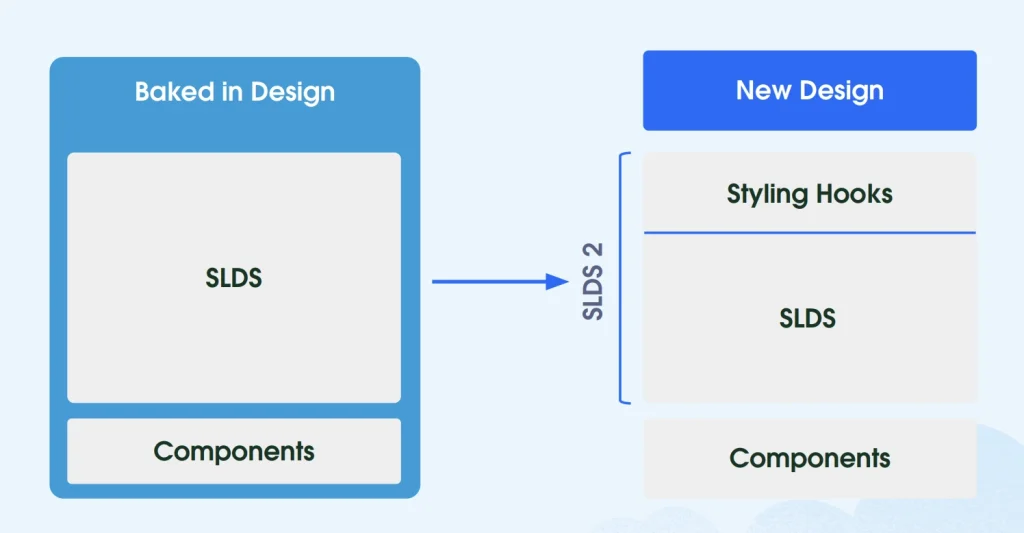
SLDS 1 was mainly a CSS framework that helped developers create UI components that matched the Salesforce Lightning design. It provided ready-to-use styles, icons, and layouts. This made development faster and ensured consistency.
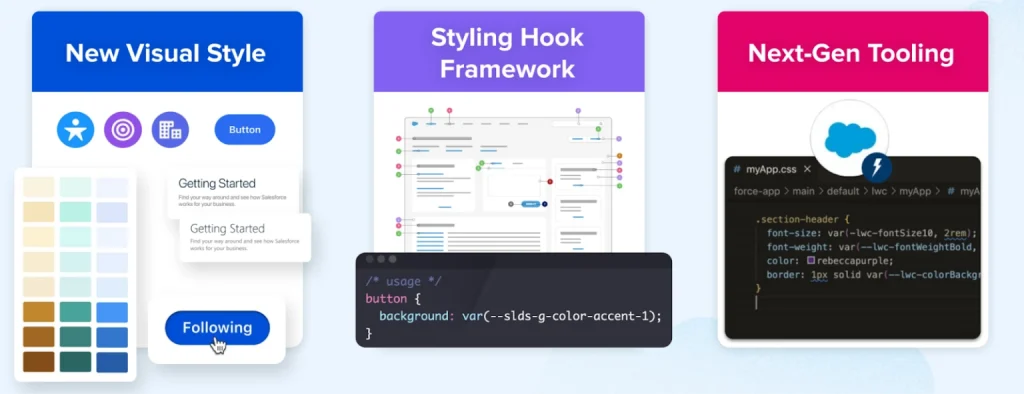
SLDS 2 is the next version and it brings more flexibility and control. It supports better branding, improved styling options, and easier customization. It also works well with the new Salesforce Cosmos theme.
The biggest advantage of SLDS 2 is that it allows teams to create custom UI designs without breaking the standard Salesforce look. It gives more control to admins, designers, and developers.
Another important point is that SLDS 2 does not change functionality. It only improves styling and design. This means your existing features will continue to work, but the UI will look better and perform faster.
How SLDS 2 Improves Salesforce User Experience
SLDS 2 focuses on making the UI simple, fast, and user-friendly. A better UI helps users complete tasks quickly and reduces errors.
One major improvement is better color contrast and accessibility. This helps users who have difficulty reading or using complex interfaces. It also follows accessibility guidelines, which is important for modern applications.
Another improvement is faster page loading. SLDS 2 reduces extra styling load, which makes record pages and dashboards load faster.
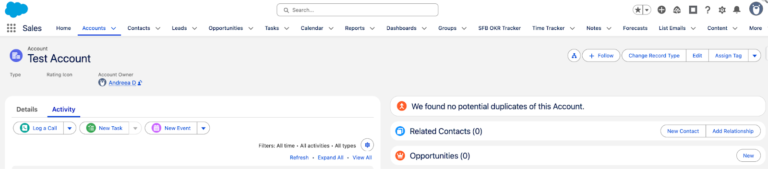
The design is also more modern and clean. Users can easily find buttons, fields, and actions without confusion. This improves overall productivity.
Salesforce Community Cloud Services
Each Role Can Contribute to Adoption
SLDS 2 allows different roles in a company to contribute to the UI upgrade. Each role has its own responsibility.
Admins can manage themes and branding. Designers can create user-friendly layouts. Developers can update code and components.
This teamwork helps in smooth implementation and ensures that the UI meets business needs.
Salesforce Admin Role in SLDS 2 Setup

Salesforce admins play a key role in enabling SLDS 2. They can go to the Themes and Branding section in setup and activate the new theme.
It is always better to test changes in a sandbox before applying them to production. This helps avoid issues and ensures everything works properly.
Admins can customize colors, branding, and layout without writing code. This makes it easy to match the UI with company branding.
Admins should also check all pages, apps, and components after enabling SLDS 2 to make sure everything looks correct.
Salesforce Marketing Cloud Services
Salesforce UX Designer Role in UI Improvement
UX designers focus on creating a smooth and easy experience for users. With SLDS 2, designers can use new tools like Figma libraries to design better interfaces.
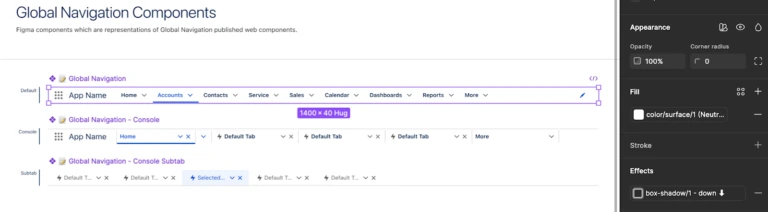
These tools help designers create layouts that match Salesforce standards. They can also test different design ideas before development.
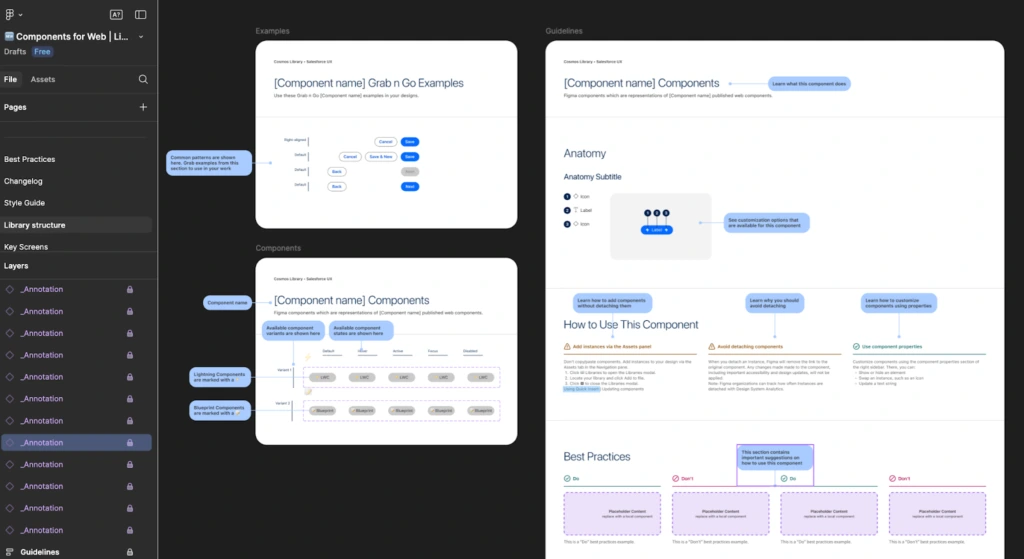
Consistency is very important in UI design. SLDS 2 helps designers maintain the same style across all pages.
Designers also ensure that the UI is accessible and easy to use for all users.
Salesforce Developer
As a Salesforce Developer, moving to SLDS 2 can be simple if your existing components already follow SLDS 1 guidelines. When your code is structured properly, the upgrade does not require major changes. The first step is to enable SLDS 2 in a sandbox or scratch org so you can safely test all updates before applying them to production.
After enabling SLDS 2, developers should install and configure an SLDS validator tool. This tool helps in scanning the existing code and generating a detailed report. The report highlights areas where the code does not follow SLDS 2 standards. Based on this, developers can fix issues and improve the quality of components.
It is important to carefully review the validator results and apply the suggested improvements. This includes updating old styles, removing unsupported patterns, and aligning components with new SLDS 2 guidelines. Once updates are done, developers should follow their regular process of building, testing, and deploying changes to ensure stability.
The validator supports both SLDS 1 and SLDS 2, which makes it easier to maintain consistency across the system. However, some features like Visualforce pages are not fully supported in SLDS 2 yet. In such cases, developers should continue using SLDS 1 styling until full support is available.
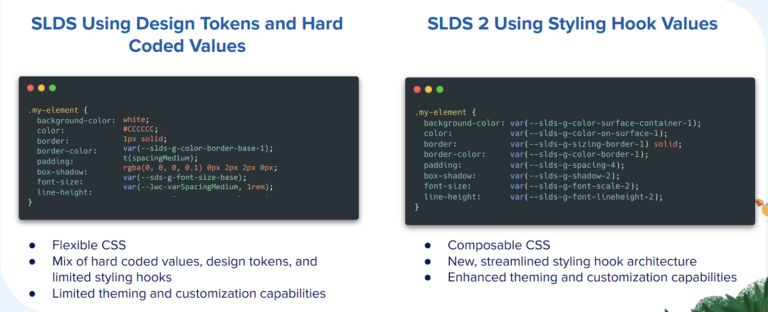
One of the most important features in SLDS 2 is styling hooks. These are CSS custom properties that store values like colors, fonts, spacing, and border radius. Styling hooks make it easier to manage design changes without modifying core code. They help maintain consistency across multiple components and improve scalability.
When developers work together with designers using tools like Figma libraries, it becomes easier to match design and development. The same styles and components can be used on both sides, which reduces confusion and improves accuracy.
Using the new styling hook system instead of older styling methods allows better customization and a more consistent user interface. This helps in creating a clean, modern, and scalable Salesforce UI that works well across all pages and devices.
Salesforce Development Services
Key Features of SLDS 2 Styling and Design
SLDS 2 introduces modern styling features that improve both design and performance.
One important feature is styling hooks. These allow developers to change UI styles without modifying core code. This makes updates faster and safer.
Another feature is better design consistency. All components follow the same style rules, which creates a uniform experience.
SLDS 2 also supports responsive design, which means the UI works well on different screen sizes.
Important Considerations Before Moving to SLDS 2
Before enabling SLDS 2, there are a few important points to consider.
Not all Salesforce apps fully support SLDS 2 yet. Some areas may still use older styles.
If you are using a custom SLDS 1 theme, you may need to recreate it in SLDS 2.
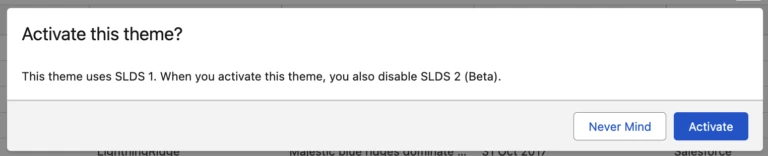
Switching back to SLDS 1 will disable SLDS 2 features, so changes should be planned carefully.
Testing is very important. Always check all pages, components, and integrations before final rollout.
Resources to Get Started with SLDS 2
To implement SLDS 2 successfully, you can use available resources and tools.
Salesforce provides documentation and guides for setup and customization. These resources help teams understand how to use SLDS 2 properly.
Design tools like Figma help in creating UI layouts. Developer tools help in updating and testing code.
Say ‘Yes’ to the Power of Global Styling Hooks
What is SLDS 2 (Beta)? It’s a Path to the Future
Lightning Design System Basics
Salesforce Cosmos Theme and SLDS 2 Availability (Beta)
Salesforce Consulting Services
Final Thoughts on SLDS 2 Salesforce UI Upgrade
SLDS 2 is a strong step towards improving Salesforce UI and user experience. It makes the system faster, cleaner, and easier to use.
With better design tools, improved customization, and role-based support, teams can upgrade their UI without major issues.
Businesses that adopt SLDS 2 early can provide a better experience to users and stay ready for future updates in Salesforce.
A well-designed UI always leads to better productivity, higher user satisfaction, and improved business performance.
CRM Implementation Services by iBirds Services
FAQs
1. What is SLDS 2 in Salesforce?
SLDS 2 is the updated version of Salesforce Lightning Design System that improves UI design, flexibility, and performance. It helps create better user experience across Salesforce apps.
2. Does SLDS 2 affect functionality?
SLDS 2 does not change functionality. It only improves the design and styling of the UI while keeping all existing features working as before.
3. Is it safe to enable SLDS 2 in production?
It is recommended to test SLDS 2 in a sandbox first before enabling it in production. This helps identify any issues and ensures smooth implementation.
4. What are styling hooks in SLDS 2?
Styling hooks are CSS variables that allow developers to customize UI elements like colors and spacing. They make design updates easier and more flexible.
5. Can SLDS 1 and SLDS 2 work together?
Yes, some parts of Salesforce may still use SLDS 1 while others use SLDS 2. Full transition depends on feature support and system setup.
6. Who should manage SLDS 2 implementation?
Admins, designers, and developers all play a role in SLDS 2 implementation. Each team handles different parts of the UI upgrade process.